Working from your van: what do you really need?
Working from your van sounds like the ultimate freedom to many people. Laptop open, coffee ready, sliding door open and working with a view of the sea, forest or a quiet village square. And yes, sometimes it really is that beautiful.
By Laurens De Leeuw · 8 July 2026
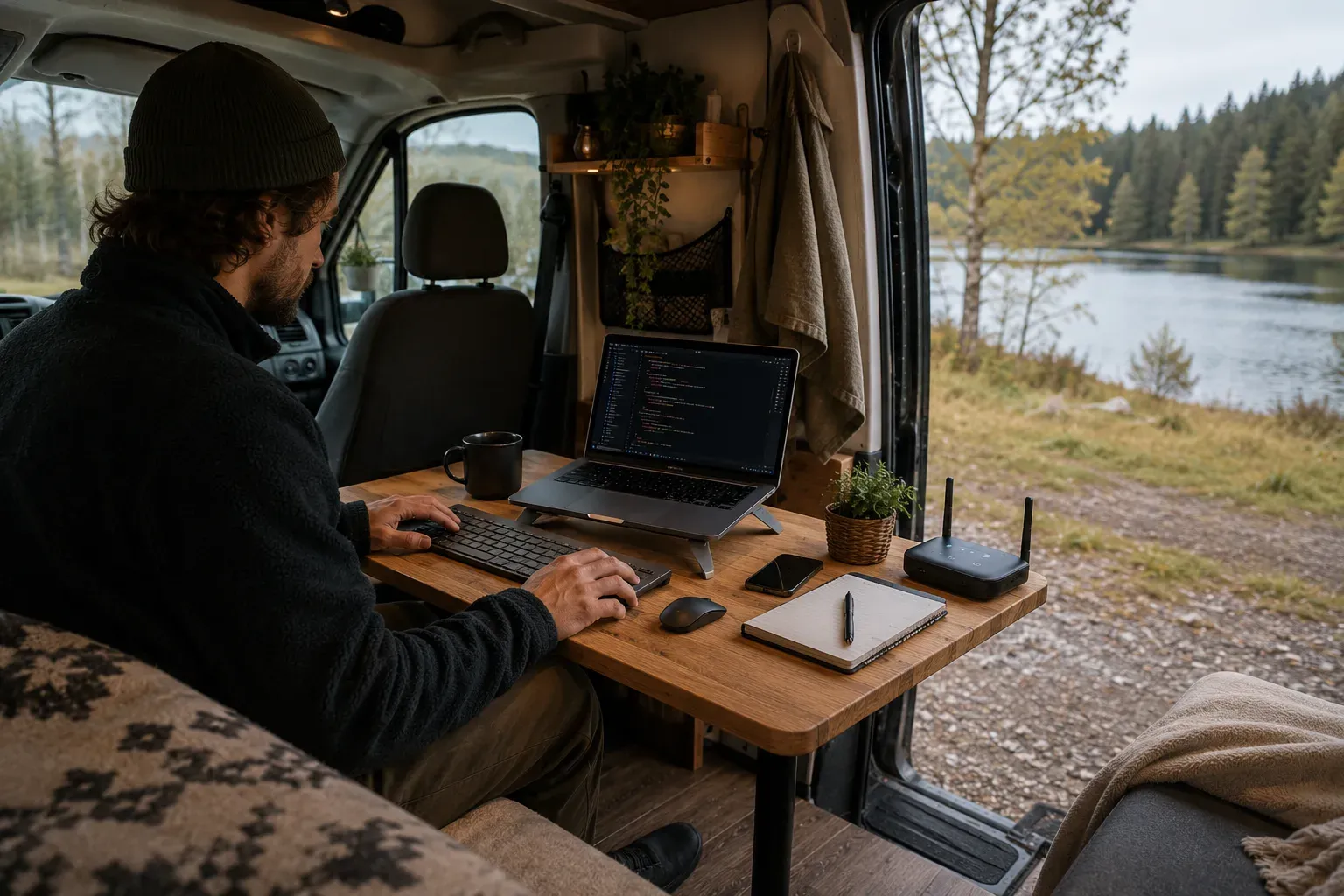
Working from your van sounds like the ultimate freedom to many people. Laptop open, coffee ready, sliding door open and working with a view of the sea, forest or a quiet village square.
And yes, sometimes it really is that beautiful.
But not always.
Sometimes you're hunched over your laptop, your battery is almost dead, your hotspot is faltering, it's raining inside through your open door, your chair isn't comfortable, and you're on a video call while someone next to your van is letting their dog bark.
Working from your van can be fantastic, but only if you approach it practically. It's not just about a laptop and internet. You need power, a good working posture, peace, privacy, a backup plan, and a rhythm that keeps working on the road.
The difference between “just answering an email” and “really working from your van” is greater than many people think.
Start with the question: how seriously do you need to be able to work?
Not everyone needs the same work setup.
If you occasionally answer an email, do some administration, or plan a route, you can get by with little. A laptop, phone hotspot, and charged power bank might be enough.
But if you need to help customers on the go, do video calls, build websites, upload files, create invoices, or have fixed deadlines, your van suddenly becomes a mobile office. Then your system needs to be more reliable.
First, ask yourself these questions:
- Do I really need to be able to work on the road, or just follow up on things occasionally?
- Do I need internet daily?
- Do I need to be able to do video meetings?
- Do I work with large files?
- Do I need privacy for customer data?
- How many hours a day do I spend behind my laptop?
- Can I postpone work if my connection is bad?
- Do I have an employer who needs to agree to remote work from another location?
That last question is often forgotten. If you are self-employed, you decide a lot yourself. If you are employed, remote work is something for which agreements exist. Think about accessibility, workplace, equipment, safety, costs, and what your employer does or does not allow.
Your laptop is not your entire office
Many people think: laptop with me and done.
But after a few hours, you notice that a laptop alone doesn't always work comfortably. Especially not in a small van, where your table is just too low, your couch just too soft, your neck is bent down, and your wrists are in an awkward position.
For short work, that's okay. For a full workday, it's not.
A simple mobile work setup can consist of:
- laptop
- laptop stand
- external keyboard
- external mouse
- good charger
- power bank or fixed 12V/230V charging option
- phone or router for internet
- earbuds or headset
- notebook
- small lamp
- external SSD or cloud backup
- VPN if you work with sensitive data
You don't have to buy everything at once. But if you work often, a laptop stand, keyboard, and mouse are almost always worth it. Your neck and back will thank you.
Ergonomics are not just for offices
A van is not an office. You often sit on a bed edge, bench, swivel chair, or camping chair. That can be cozy, but not always healthy.
Belgian information on remote work and screen work points to risks such as back pain, eye strain, prolonged sitting, and poor workstation design. That may sound a bit official, but on the road, you'll feel it soon enough.
After an hour of hunching, there's usually nothing wrong. After five days of working at a table that's too low, your body starts to protest.
Therefore, try to follow these basic rules:
- raise your screen, preferably to eye level
- use an external keyboard and mouse if you work longer
- sit with your feet firmly supported
- change posture regularly
- take short breaks
- look into the distance occasionally to rest your eyes
- don't work for hours on your bed every day
- ensure your shoulders remain relaxed
A laptop stand doesn't have to be big. There are light, foldable models that take up almost no space. Together with a compact keyboard and mouse, that already makes a huge difference.
A good chair is more important than a beautiful table
In a small van, a lot of attention goes to the tabletop. Wood type, shape, extendable system, swivel leg, foldable design. All nice.
But your chair often determines more than your table.
If your seating area is too low, too soft, or doesn't provide support, you automatically work poorly. A sofa bed is cozy for half an hour, but not always for a full day.
A swivel passenger seat can be a very good workplace, especially if you have a sturdy table with it. A camping chair outside can also work, but only in good weather and without reflection on your screen.
So don't just think: “where do I put my laptop?” Especially think: “where can I sit for three hours without my back being ruined?”
For me, that would really be a basic condition. If I were to work as a web developer from a van, I wouldn't want to end every day with neck pain because my workplace looks cozy but isn't right.
Power: don't underestimate your workday
Working costs power. Not just your laptop, but also your phone, router, lighting, headset, power bank, and possibly a second screen.
A laptop can theoretically last 6 to 10 hours, but in practice, that depends on screen brightness, software, video meetings, battery age, and temperature. A video call with camera and screen at high brightness drains much faster than writing a text.
Therefore, don't calculate your power too tightly.
A simple workday can look like this:
| Device | Usage | Estimated Consumption |
|---|---:|---:|
| Laptop | 4 hours | 200 to 400 Wh |
| Phone charging | 1 to 2 times | 15 to 40 Wh |
| 4G/5G router | 6 hours | 30 to 80 Wh |
| LED lighting | 3 hours | 20 to 50 Wh |
| Headset/earbuds | limited | 5 to 15 Wh |
These are not exact figures for every device, but they do illustrate the point: working from your van can easily require a few hundred watt-hours per day.
If you also have a refrigerator, diesel heater, fan, or other consumers, that adds up.
Charging while driving is often more important than solar panels
Solar panels are useful, but for working on the road, they are not always enough. Especially not in Belgium, with clouds, winter days, trees, buildings, and short days.
If you drive often, charging while driving via a DC DC charger or charge booster is very interesting. Then you charge your leisure battery while you are moving.
If you often stand still for several days, solar panels do help. But don't rely on them blindly, especially if your work depends on a full laptop and router.
Shore power also remains useful. A campsite, campervan pitch, or visit to friends can suddenly become a reset moment: battery full, laptop full, power banks full, charge everything, and then stand more freely again.
My practical advice: if work is important, combine charging sources. Relying solely on one way to get power is vulnerable.
Internet: one connection is good, two is better
For a regular trip, one connection is usually enough. For work, not always.
A phone hotspot works fine for light use. But if you have video calls, client work, or deadlines, you want more certainty.
A good work setup can consist of:
- phone hotspot as a base or backup
- separate 4G/5G router
- SIM card with sufficient data
- possibly a second SIM card on a different network
- offline access to important files
- pre-tested workplaces
The BIPT has a mobile coverage map where you can view coverage per operator and technology. This is useful for getting an idea beforehand. But practice can still differ due to your exact location, metal bodywork, trees, buildings, weather, network congestion, and your device.
Therefore, testing on the spot itself remains important. Especially for video meetings.
A place with a beautiful view is not automatically a good workplace. Sometimes you have the best connection in a boring parking lot near a village. That's not romantic, but it's useful if you have to work.
Upload is at least as important as download
Many people only look at download speed. But for work, upload is often just as important.
You need upload for:
- video meetings
- sending files
- cloud storage
- managing websites
- uploading photos
- backups
- screen sharing
A connection can be fast enough to view websites, but still work poorly for a video call. Therefore, it's best not only to test if “internet works,” but also if you can effectively do what you need to do.
For an important call, I would always test beforehand:
- does the VPN work?
- does the connection remain stable?
- is upload sufficient?
- does video not stutter?
- is it quiet enough?
- do I have enough battery?
- is my laptop charged?
- is my phone or router in the best place?
Don't do that five minutes before the meeting. Do it well in advance.
Public Wi-Fi: convenient, but not as a primary source
Wi-Fi at campsites, cafes, libraries, or stations can be useful. But don't rely on it blindly.
Sometimes it's slow, overloaded, or only strong near the reception. Sometimes it drops out when everyone starts streaming in the evening. And public Wi-Fi is not always secure.
Safeonweb advises caution with public Wi-Fi, preferably using mobile data or a shared 4G/5G connection and using a VPN when you do need public Wi-Fi.
For work, I would only use public Wi-Fi if you know what you're doing. Especially with customer data, logins, administration, or company documents, you don't want to work on just any open network.
Practically:
- prefer mobile data for sensitive work
- use a VPN
- avoid banking on public Wi-Fi
- check if the network really belongs to the location
- turn off automatic Wi-Fi connection
- do not share files via unknown networks
- log out where necessary
Public Wi-Fi is okay as an extra, but not as the foundation of your workday.
Privacy in a small space
Working from your van also means thinking about privacy.
You sometimes sit in parking lots, campervan pitches, campsites, village squares, or along a hiking trail. People can walk past your window, look inside, or see your screen. During phone calls, someone nearby might overhear.
That's not always bad, but it is if you're working with customer data, internal documents, invoices, personal info, or sensitive projects.
Consider:
- don't point your screen outwards
- privacy filter on your laptop
- use a headset for calls
- don't discuss client names loudly in busy places
- don't leave documents visible
- lock your laptop when you get out
- don't leave valuables visible
A van is not a closed office. You have to ensure that your work is not easily visible or audible.
Security of your equipment
A laptop, camera, phone, router, and power bank are attractive to thieves.
Don't leave them visible. Not even “just for five minutes.” A laptop on the table, a backpack on the passenger seat, or a camera next to the bed attracts attention.
Make it a habit to put away your work equipment when you're not working. Preferably in a fixed, out-of-sight place. Also think about backups. Equipment can be stolen, but losing data is sometimes even worse.
Use at least:
- password or biometric lock on laptop
- encrypted drive if possible
- cloud backup or external backup
- two-step verification
- password manager
- device tracking feature where possible
You don't have to become paranoid, but on the road, you need to be a bit more conscious about equipment than at home.
Work and private life quickly blend together
In a van, your office is also your kitchen, bedroom, and living room. That's cozy, but also dangerous for your peace of mind.
Your laptop is always nearby. Just one more email. Just quickly adjust something. Just answer another message. Before you know it, you're half-working and half-traveling all evening.
Therefore, create clear moments.
For example:
- work from 9 to 12
- break and walk
- another 2 hours of focused work
- close laptop
- put away work materials
- turn the van back into a living space
That last part is important. If your laptop always stays open, your van never truly feels like a free space. Especially in a small van, you sometimes literally have to put away your work to mentally switch off.
Plan your work around your trip, not the other way around
The romantic version is: you drive wherever you want and work whenever you feel like it.
The realistic version is: you plan workplaces around power, internet, peace, and appointments.
Do you have an important call? Plan it in a place with a tested signal. Do you need to upload large files? Do that at a campsite, coworking space, or with stable Wi-Fi. Do you want to do a day of deep focused work? Choose a quiet place and not a busy tourist parking lot.
You can be more flexible for light tasks. For important tasks, it's better to plan.
A good week on the road can look like this:
- travel day with short emails
- workday in a place with good 5G
- half-day administration at a campsite
- day off without a laptop
- upload moment with stable Wi-Fi
- focus block in the morning
- calls only in tested locations
This way, working from your van remains enjoyable instead of chaotic.
Coworking and libraries are underestimated
You don't always have to work in your van.
Sometimes a library, coworking space, coffee shop, or sports center with a cafeteria is simply smarter. You have a table, chair, heating, toilet, power, and often better internet.
This can be especially useful on rainy days, during long workdays, or when you really need to concentrate.
The van doesn't have to be your office every day. Sometimes the best work setup is: sleeping and traveling in your van, but working for a few hours in a better place.
Especially in Belgium, where villages and cities are close to each other, that's an advantage. You usually don't have to drive far to find a quiet place with amenities.
Working in cold or wet weather
In summer, working from your van seems simple. Door open, fresh air, coffee ready.
In winter, it's different.
You get cold hands faster, condensation on windows, damp clothes, less light, and more power consumption. Your router and laptop need power, but perhaps also your heating and lighting.
Therefore, ensure:
- good ventilation
- warm socks
- layered clothing
- dry workplace
- sufficient lighting
- condensation cloth
- heating that is safe
- no laptop on a damp surface
- fixed place for wet jacket and shoes
A damp van quickly feels unpleasant to work in. Dryness and ventilation are therefore not only comfort but also productivity.
Light makes a big difference
Good light is often underestimated.
In a dark van, you'll slouch, squint, and get tired faster. Especially on gray Belgian days, extra light can help.
A small, warm LED lamp above your workspace is useful. Make sure it doesn't reflect directly on your screen. If you often work in the evening, choose light that is bright enough to work but not so bright that your van becomes uninviting.
Daylight is even better. Park so that you have light without your screen becoming unreadable due to reflection. Sometimes moving your van half a meter is enough.
Sound: think about calls
For video meetings, sound is often more important than video.
People can live with a slightly less sharp camera. But bad audio is annoying. Wind, rain on the roof, traffic, barking dogs, children, music from neighbors, or a diesel heater can be disruptive.
A good headset with a microphone helps enormously. Also, find a quiet place for calls. Close windows and doors if possible, but pay attention to ventilation and temperature.
If you're at a campsite or parking lot, don't plan important calls at the busiest time of day. Early morning or late morning is sometimes quieter than evening.
What do you really need? The basic list
For occasional work:
- laptop
- phone hotspot
- charger
- power bank
- earbuds
- notebook
- offline maps
- simple data planning
For regular work:
- laptop stand
- external keyboard
- mouse
- separate 4G/5G router
- sufficient data bundle
- fixed charging option
- good lamp
- headset
- cloud backup
- VPN
For serious work on the road:
- strong power setup
- router with good placement
- second SIM card or eSIM as backup
- possibly external antenna
- privacy filter
- ergonomic seating
- clear work planning
- backup workplace such as library or coworking
- agreements with employer or clients
- decent data security
You don't have to go for the heaviest setup all at once. Start with what you need and upgrade when you notice what challenges you face.
What you don't need
You don't immediately need a perfect office van.
No built-in desk with three screens. No expensive 5G router if you send an email once a month. No gigantic battery if you only do short administrative tasks. No full studio if you mainly want to be on the road.
Many people build too much too quickly. Then they have less living space, more weight, and more things that can break.
Keep it simple enough to actually use. A small, comfortable workspace that can be quickly tidied up is often better than a large desk that is always in the way.
My practical setup as a starting point
If I were to furnish a van myself to be able to work regularly, I would start with a simple but solid base.
A laptop with a good battery. A foldable laptop stand. Compact keyboard and mouse. A 4G/5G router or at least a strong phone hotspot. A good power bank and fixed charging option in the van. A headset for calls. A small lamp above the workspace. And most importantly: a seating area where I can sit normally for more than an hour.
I would also always have a backup plan. If my connection is bad, I need to be able to go to a village, library, campsite, or place with better coverage. Because freedom is nice, but deadlines remain deadlines.
Working from your van should increase your freedom
The goal of working from your van is not to be reachable everywhere and always. Then your van just becomes an office on wheels.
The goal is to gain more freedom. Work when necessary, travel when possible, and have enough structure so that both continue to succeed.
For that, you don't need a perfect setup. You need a reliable foundation: power, internet, seating comfort, privacy, security, and a work rhythm.
Start simple. Test in real conditions. Work half a day from your van before deciding you want to be on the road with it for weeks. You'll quickly notice what's missing.
A good mobile workplace feels calm. Your laptop is stable, your internet works, your battery lasts, your back doesn't hurt, and after work, you can put everything away.
Then your van becomes what it was meant to be again: not a messy office, but a place that enables freedom.
Source: https://werk.belgie.be/nl/themas/welzijn-op-het-werk/telewerk
Source: https://www.bipt.be/consumenten/telefoon-internet-tv/operatoren-vergelijken/dekking
Source: https://safeonweb.be/nl/actueel/deze-3-tips-houden-je-cyberveilig-op-vakantie
Source: https://economie.fgov.be/nl/publicaties/algemeen-reglement-op-de